How to Choose the Best WiFi Router for Home in Bangladesh (2026 Guide)
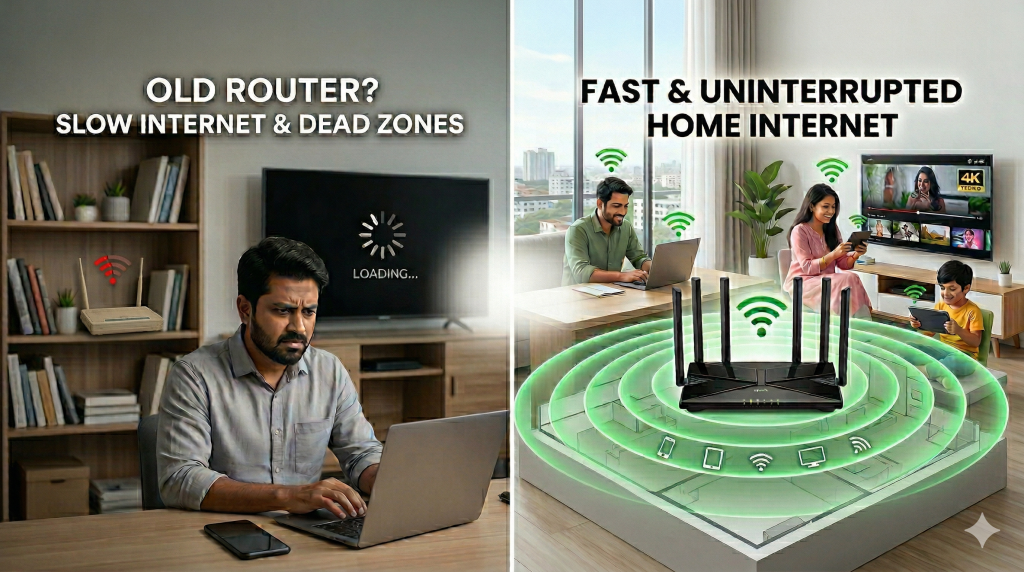
Finding the best WiFi router for home in Bangladesh is essential if you want fast, stable, and uninterrupted internet. Many users upgrade to high-speed broadband but still experience slow downloads, buffering, and weak signals in different rooms. In most cases, the problem is not the internet connection—it’s the router that fails to deliver consistent performance.
From remote work and online classes to 4K streaming and gaming, modern households depend on reliable WiFi more than ever. A low-quality or outdated router can limit your actual speed, reduce coverage, and struggle to handle multiple devices at once. That’s why choosing the right router based on your usage and home environment is critical.
If you are using a trusted ISP like North Bengal Online, known for its fiber-optic network and stable connectivity across Rajshahi and surrounding areas, pairing it with the right router will help you unlock maximum speed and performance.
In this complete guide, you will learn exactly how to choose the best WiFi router for your home, step by step.
Why Choosing the Right WiFi Router Matters for Speed and Coverage:
Many users in Bangladesh believe that internet speed depends only on their ISP, but in reality, your WiFi router plays a critical role in overall performance. Even with a high-speed fiber connection, a poor-quality or outdated router can significantly reduce your actual internet speed and stability.
A router is responsible for distributing internet across your home, and if it cannot handle multiple devices or provide proper coverage, you will experience common issues such as:
- Slow browsing and delayed page loading
- Buffering while streaming YouTube or Netflix
- Weak WiFi signal in different rooms
- Lag and high ping during online gaming
In simple terms, your ISP delivers internet to your home, but your router controls how efficiently that speed is used across all your devices.
That’s why choosing the right WiFi router is essential to ensure maximum speed, strong signal coverage, and a smooth online experience.
How to Choose the Perfect WiFi Router for Your Home in Bangladesh?
Choosing the right WiFi router is not just about speed—it’s about ensuring seamless connectivity across your home. With multiple devices, streaming, gaming, and remote work, a poor router can slow down your internet and cause frustrating dead zones. The following step-by-step guide will help you select a router that matches your internet usage, home size, and device requirements for the best possible performance in Bangladesh.
Step 1 – Understand Your Internet Usage and Bandwidth Needs
Before choosing the best WiFi router for your home, it’s important to understand your daily internet usage and how many devices are connected at the same time. Your router performance depends heavily on your usage type, bandwidth requirements, and number of users in your household.
Here’s a simple breakdown to help you choose the right router based on your needs:
- Light Usage: Browsing websites, Facebook, email, and occasional YouTube → A basic single-band or entry-level router is sufficient
- Medium Usage: HD streaming (Netflix, YouTube), Zoom meetings, and 3–5 devices → A dual-band WiFi router (AC1200 or higher) is recommended
- Heavy Usage: Online gaming, 4K streaming, smart home devices, and multiple users → A high-performance WiFi 6 router (AX series) is the best choice
💡 Real Example (Bangladesh Context):
If your internet package is between 40–100 Mbps, which is common among ISPs in Bangladesh, a low-end router may struggle to handle multiple devices efficiently. This can lead to slow speeds, buffering, and unstable connections, especially during peak usage times.
👉 Choosing a router that matches your internet usage ensures better speed, stronger signal coverage, and a smoother online experience.
Step 2 – Choose the Right WiFi Standard for Better Speed and Performance
Modern WiFi routers come with different wireless standards, and choosing the right one is essential for getting the best internet speed and performance at home. If you are using a fiber internet connection in Rajshahi or nearby areas, selecting an advanced WiFi standard can significantly improve your browsing, streaming, and gaming experience.
Here are the most common WiFi standards you should know:
- WiFi 4 (802.11n): An older technology with limited speed and performance — not recommended for modern usage
- WiFi 5 (802.11ac): Suitable for most households, offering good speed and stable connectivity for everyday use
- WiFi 6 (802.11ax): The latest technology, designed for high-speed internet, multiple devices, and low latency
👉 Expert Recommendation: If your budget allows, choose a WiFi 6 router, especially if you live in urban areas like Rajshahi where multiple devices are connected at the same time. It offers:
- Faster internet speeds for streaming and downloads
- Better performance with multiple users and devices
- Lower latency for gaming and video calls
- Improved efficiency in high-density networks
💡 For users of ISPs in Rajshahi, upgrading to a WiFi 6 router ensures you can fully utilize your broadband speed without interruptions.
Step 3 – Consider Your Home Size and WiFi Coverage Area
One of the most important factors when choosing the best WiFi router for your home is coverage area. Many users in Bangladesh, especially in cities like Rajshahi, face weak signals in certain rooms simply because their router cannot cover the entire space properly.
WiFi signal strength depends on your home size, wall structure, and router placement. If your router is not powerful enough, you may experience slow speeds or connection drops in different areas of your home.
Here’s a simple guide based on home size:
- Small Room or Studio Apartment: A basic single-band or entry-level router is usually enough
- Medium-Sized Flat (2–3 rooms): A dual-band WiFi router provides better coverage and stable performance
- Large House or Multi-floor Building: A mesh WiFi system is highly recommended for full coverage without dead zones
👉 If your router is placed in one corner of your home, the signal may not reach other rooms effectively, especially through thick walls.
💡 Pro Tip: Place your router in a central, elevated, and open location to ensure maximum WiFi coverage and stronger signal distribution throughout your home.
Step 4 – Router Speed vs Real Internet Speed
When buying a WiFi router, many people get confused by labels like AC1200, AC1750, or AX3000. These numbers represent the maximum theoretical speed of the router—not the actual internet speed you will get at home.
Important Truth: Your real internet speed depends mainly on your ISP package and device capability, not just your router.
Here’s what you need to understand:
- Router Speed (e.g., AC1200, AX3000): Maximum combined wireless capacity under ideal conditions
- ISP Speed (e.g., 50 Mbps, 100 Mbps): The actual internet speed delivered to your home
- Device Limitations: Older phones or laptops may not support high speeds
💡 Real Example (Bangladesh Context): If your internet package is 50 Mbps, even if you use an AC1200 or AX3000 router, your maximum speed will still be around 50 Mbps. The router cannot increase your ISP speed—it can only distribute it efficiently.
👉 That’s why it’s important to choose a router that matches your internet plan, rather than relying on marketing numbers printed on the box.
Step 5 – Single Band vs Dual Band vs Tri Band Routers
When choosing the best WiFi router for your home, understanding the difference between single band, dual band, and tri band routers is very important. These bands determine your WiFi speed, coverage, and performance, especially when multiple devices are connected.
Here’s a simple comparison to help you decide:
🔹 Single Band Router (2.4 GHz)
- Covers a longer distance and works through walls
- Slower speed compared to modern standards
- Suitable for light usage like browsing and social media
🔹 Dual Band Router (2.4 GHz + 5 GHz)
- Offers both range (2.4 GHz) and high speed (5 GHz)
- Ideal for streaming, online classes, and multiple users
- Reduces network congestion by separating devices
🔹 Tri Band Router (2.4 GHz + 5 GHz + 5 GHz)
- Designed for heavy users and smart homes
- Handles many devices at the same time with less lag
- More expensive and not necessary for most households
👉 Expert Recommendation: For most homes in Bangladesh, including areas like Rajshahi, a dual band WiFi router is the best choice. It provides the perfect balance of speed, coverage, and affordability for everyday internet use.
Step 6 – Must-Have WiFi Router Features
Choosing the right WiFi router isn’t just about speed—it’s also about the features that ensure stable, secure, and efficient internet for your household. If you live in Rajshahi or other areas in Bangladesh and use multiple devices, these are the essential router features you must look for:
✅ MU-MIMO (Multiple User, Multiple Input, Multiple Output)
MU-MIMO allows your router to communicate with multiple devices simultaneously, reducing lag, buffering, and connection drops. It ensures that everyone in your home can stream videos, make video calls, or play online games at the same time without slowing down the network.
✅ Beamforming Technology
Beamforming focuses the WiFi signal directly toward your devices instead of broadcasting it in all directions. This improves signal strength, reduces dead zones, and provides a stronger, more reliable connection in every corner of your home, even through walls or multiple floors.
✅ QoS (Quality of Service)
QoS prioritizes bandwidth for specific devices or applications, ensuring that high-demand tasks like 4K streaming, online gaming, or video conferencing get the speed they need. This prevents slowdowns on important devices when other users are connected to the same network.
✅ Gigabit Ethernet Ports
Gigabit Ethernet ports allow devices like gaming consoles, smart TVs, or desktop computers to connect via cable, providing maximum speed and reliability. Wired connections are faster and more stable than WiFi alone, especially for high-bandwidth activities or large file transfers.
✅ WPA3 Security
WPA3 is the latest WiFi security standard, offering stronger encryption and protection against unauthorized access. It safeguards your personal information, prevents hacking attempts, and ensures your smart home devices remain secure while using high-speed internet in Bangladesh.
💡 Pro Tip (Rajshahi Users):
Even if you have a high-speed internet plan from local ISPs like North Bengal Online, routers without these features can limit performance. Investing in a router with these capabilities ensures reliable coverage, faster speeds, and a safer network for your family.
Step 7 – Best WiFi Router Placement Tips for Maximum Coverage
Even the fastest WiFi router will perform poorly if it is placed in the wrong location. Proper placement ensures strong signal strength, stable connections, and full coverage throughout your home, whether you live in a small flat or a large house in Rajshahi.
Here are the best practices for router placement:
Keep Your Router in Open Space
Placing your router in an open area allows the WiFi signal to travel freely without obstruction. Avoid closed cabinets, behind furniture, or crowded corners, as these can block signals and reduce speed, coverage, and overall internet performance.
Avoid Walls, Metal Objects, and Electronics
Walls, metal doors, and electronic appliances such as microwaves or TVs can interfere with WiFi signals. Position your router away from these obstacles to prevent weak spots, slow connections, or dropped signals in different rooms of your home.
Place the Router at a Higher Position
Mounting your router on a shelf, high table, or wall improves signal distribution across your home. Higher placement allows WiFi waves to cover more areas efficiently, reaching rooms and floors that may otherwise experience weak connectivity.
Don’t Hide Your Router Inside Cupboards or Closets
Keeping your router hidden inside cupboards or cabinets dramatically reduces signal strength and coverage. For optimal performance, keep your router visible, with antennas positioned for maximum range, ensuring all devices in your home enjoy stable internet.
💡 Pro Tip (Rajshahi Users): Even with a high-speed fiber connection from local ISPs like North Bengal Online, poor router placement can create slow spots in your home. Following these placement tips ensures you maximize speed, coverage, and stability for all devices.
Step 8 – Best Router Based on Usage
|
Usage Type |
Recommended Router |
|
Basic home |
N300 / AC1200 |
|
Medium family |
AC1200–AC2000 |
|
Heavy users |
AX3000 WiFi 6 |
|
Large home |
Mesh WiFi |
Step 9 – Common WiFi Router Mistakes to Avoid
Many people in Rajshahi, Bangladesh make avoidable mistakes when buying a WiFi router, which can lead to slow internet, weak signals, and frustrated users. Avoid these common errors to ensure your home network works efficiently and fully utilizes your ISP speed.
⚠️ Buying the Cheapest Router
While it’s tempting to save money, cheap routers often lack coverage, speed, and essential features like MU-MIMO or QoS. Investing in a reliable router ensures faster connections, stronger WiFi signals, and better performance for multiple devices at home.
⚠️ Ignoring Your Home Size
A router that works in a small room may not cover larger flats or multi-story houses. Failing to consider home size can result in dead zones and weak WiFi in some rooms, reducing your overall internet experience.
⚠️ Using Old Routers (5+ Years)
Routers older than five years often cannot handle modern WiFi standards, multiple devices, or high-speed internet. Using outdated routers in Rajshahi homes can limit performance, cause frequent disconnections, and prevent you from taking full advantage of your ISP package.
⚠️ Trusting “Box Speed” Only
Router labels such as AC1200 or AX3000 show maximum theoretical speed, not your actual internet speed. Relying only on box numbers can mislead you, as real performance depends on your ISP speed and connected devices.
⚠️ Not Upgrading with Your ISP Speed
If you upgrade your internet package but keep the old router, you may not get faster speeds. Always ensure your router matches or exceeds your ISP’s plan to enjoy full bandwidth and smooth connectivity throughout your home.
💡 Pro Tip (Rajshahi Users): Combining a quality router with proper placement and features from a trusted ISP like North Bengal Online ensures maximum speed, coverage, and stable internet for all your devices.
Best Router + ISP Combination for Maximum Home WiFi Performance
To get the fastest and most reliable internet at home in Rajshahi, Bangladesh, it’s not enough to have just a high-speed internet plan. You also need a router that can fully utilize your ISP’s speed and provide strong coverage throughout your home. The key is to combine a quality ISP with a capable router.
👉 Why This Combination Matters
Even with a high-speed fiber plan, an old or low-quality router can bottleneck your connection, causing buffering, weak signals, and slow downloads. Pairing your ISP with a router that supports modern WiFi standards, multiple devices, and strong coverage ensures you get the full potential of your internet plan Rajshahi.
✅ What to Look for in an ISP + Router Setup
- Fiber Internet Connection: Provides faster, stable speeds compared to DSL or ADSL
- Stable Uptime: Ensures uninterrupted connectivity for work, streaming, and gaming
- Local Customer Support: Quick troubleshooting in your area if problems arise
✅ Why Choose North Bengal Online
North Bengal Online offers high-speed fiber optic internet with 24/7 support, stable uptime, and excellent coverage across Rajshahi, Naogaon, and Chapai Nawabganj. When combined with a quality WiFi router, you can enjoy:
- Maximum download and upload speeds
- Reliable connections on multiple devices
- Smooth HD streaming, gaming, and remote work without interruptions
💡 Pro Tip (Rajshahi Users): Even the best routers cannot perform well with a poor ISP. For households in Rajshahi and nearby districts, pairing a modern router with North Bengal Online ensures the fastest, most stable, and secure home WiFi network possible.
Conclusion
Choosing the right WiFi router is just as important as selecting a reliable ISP in Rajshahi, Bangladesh. Even the fastest fiber connection won’t guarantee smooth streaming, gaming, or work if your router cannot handle your household needs.
By understanding your usage, selecting the right WiFi standard, focusing on coverage, and choosing routers with essential features, you can dramatically improve your home WiFi performance.
For households in Rajshahi, Naogaon, and Chapai Nawabganj, combining a modern router with North Bengal Online’s fiber internet ensures maximum speed, stable connectivity, and strong coverage.